When we think of smart home technology, we might picture young tech enthusiasts controlling everything from their phones. But the real revolution is happening in aging-in-place care, where the right technology can mean the difference between a parent safely staying home or needing to move to assisted living.
The best part? Voice-controlled devices are often easier for seniors to use than traditional technology. Instead of fumbling with small buttons or confusing smartphone apps, your parent can simply say "turn on the lights" or "call my daughter." This guide walks you through the most valuable smart home technologies for aging parents, how to set them up, and how to help your parent embrace them.
Voice Assistants: The Foundation of a Smart Senior Home
A voice assistant is the single most valuable smart home investment for an aging parent. These devices respond to spoken commands, eliminating the need to physically interact with switches, remotes, or smartphones.
What Voice Assistants Can Do for Seniors
- Control smart home devices: "Alexa, turn on the bedroom light"
- Set reminders: "Hey Google, remind me to take my medication at 8 PM"
- Make phone calls: "Alexa, call my daughter"
- Answer questions: "What's the weather today?" "What time is my doctor's appointment?"
- Play music and audiobooks: Entertainment without handling devices
- Video calls: With screen-equipped devices, see and talk to family
- Control thermostat: "Set the temperature to 72 degrees"
- Emergency help: "Alexa, call 911" (with some setup)
- Create shopping lists: "Add milk to my shopping list"
- Get news updates: Daily briefings without TV or newspaper
Amazon Echo vs. Google Nest
The two main voice assistant ecosystems each have strengths:
Amazon Echo (Alexa)
- Larger ecosystem of compatible smart home devices
- More "skills" (apps) available
- Better for controlling smart home devices
- Drop In feature allows family to check in via voice
- Echo Show devices have excellent video calling
- Devices: Echo Dot ($50), Echo ($100), Echo Show ($130-250)
Google Nest (Google Assistant)
- Generally better at answering questions accurately
- Better integration with Android phones
- More natural conversation flow
- Good for Google Calendar integration
- Devices: Nest Mini ($50), Nest Audio ($100), Nest Hub ($100-230)
Best Choice for Most Seniors
For most families, Amazon Echo is the better choice due to its larger smart home ecosystem and the Drop In feature, which lets family check on parents without them needing to answer. However, if your family already uses Google products heavily, Google Nest will integrate more smoothly.
Screen vs. No Screen
Voice assistants with screens (Echo Show, Nest Hub) offer additional benefits:
- Video calling with family members
- Visual feedback for weather, timers, reminders
- Photo slideshows when not in use
- Visual medication reminders
- Security camera viewing
For seniors who want video calls with grandchildren, a screen-equipped device is worth the extra cost.
As an Amazon Associate, we earn from qualifying purchases.
Recommended Smart Home Products for Seniors
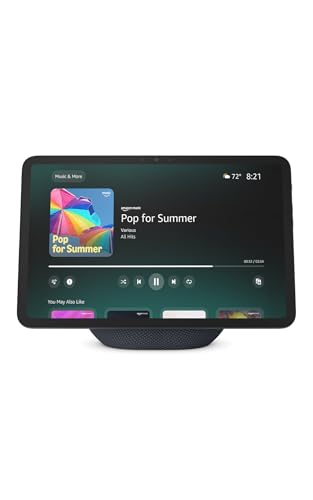 Echo Show with Large Display Voice-controlled video calls, reminders, and smart home control
 Motion-Sensor Smart Lights Automatic illumination for safe nighttime navigation
 Video Doorbell See and speak to visitors without getting up
 Smart Pill Dispenser Automated medication reminders and dispensing
Smart Lighting: Fall Prevention and Convenience
Falls are the leading cause of injury for seniors, and poor lighting is a major contributor. Smart lighting addresses this by ensuring lights are always available when needed.
Types of Smart Lighting
Smart Bulbs
Replace existing bulbs with smart versions that can be voice-controlled.
- Philips Hue: Premium option, excellent reliability ($15-30 per bulb plus $60 hub)
- Wyze Bulbs: Budget-friendly, no hub required ($8-15 per bulb)
- Sengled: Affordable, works with Echo ($10-15 per bulb)
Smart Light Switches
Replace wall switches so any bulb becomes smart.
- More permanent solution than smart bulbs
- Works with existing bulbs
- May require neutral wire (older homes may not have)
- Cost: $25-50 per switch
Smart Plugs
Plug lamps into smart plugs for voice control.
- Easiest installation, just plug in
- Works with any lamp
- Can also control fans, space heaters
- Cost: $10-25 per plug
Key Lighting Features for Seniors
Motion-Activated Lighting
Lights turn on automatically when someone enters a room. Critical for:
- Hallways and stairs
- Path from bedroom to bathroom
- Kitchen and entryways
Scheduled Lighting
- Lights turn on automatically at sunset
- Bedroom lights dim gradually at night
- Morning lights turn on gently to wake
Voice Control
- "Turn on the lights" from bed eliminates stumbling in darkness
- "Turn off all lights" at bedtime without walking room to room
- Control lights from anywhere without finding switches
Critical Path Lighting
The path from your parent's bedroom to the bathroom is the most important area for nighttime lighting. Most senior falls happen during nighttime bathroom trips. Install motion-activated lights along this entire path, including the bathroom, so your parent never walks in darkness.
Security and Monitoring
Smart security devices protect your parent from both external threats and their own vulnerability.
Video Doorbells
Video doorbells show who's at the door without opening it, essential for seniors who may be targeted by scammers or burglars.
Key features for seniors:
- See and speak to visitors via phone, tablet, or Echo Show
- Review who came by while away
- Deterrent for porch pirates and burglars
- Family can check who visits
Top options:
- Ring Video Doorbell: Works well with Alexa, various models ($100-350). Subscription for video storage ($4/month).
- Google Nest Doorbell: Works with Google Assistant ($130-180). Subscription for history ($6/month).
- Eufy Video Doorbell: Local storage, no subscription needed ($150-200).
Smart Locks
Smart locks offer keyless entry and remote access, helpful when caregivers need entry or if your parent forgets keys.
Benefits for seniors:
- No keys to lose or fumble with
- Grant temporary access codes to caregivers
- Remotely unlock for emergency responders
- Know when someone enters or leaves
- Auto-lock feature ensures door is never left unlocked
Top options:
- August Smart Lock: Retrofits existing deadbolt, keeps regular key as backup ($150-250)
- Schlage Encode: Built-in WiFi, no hub needed ($250-300)
- Yale Assure: Multiple access options, good design ($180-280)
Indoor Cameras
Indoor cameras are sensitive, they must be used ethically and with your parent's full consent.
Appropriate uses:
- Checking in when parent doesn't answer calls
- Monitoring for falls or emergencies
- Watching for wandering (dementia)
- Verifying caregiver arrival
Important considerations:
- Only use with parent's knowledge and consent
- Never in bedrooms or bathrooms
- Discuss boundaries openly
- Use privacy modes when not needed
Motion Sensors
Motion sensors track activity without the invasiveness of cameras.
Uses for senior monitoring:
- Alert family if no movement detected for unusual periods
- Track general activity patterns
- Trigger lights automatically
- Monitor if parent is up at unusual hours
Services like Caregiver Smart Solutions and Lively (formerly GreatCall) offer motion sensor monitoring packages designed for senior care.
Medical Alert Systems
Medical alert systems provide emergency help at the press of a button, and modern systems include fall detection that calls for help automatically.
Types of Medical Alert Systems
Home-Based Systems
- Base station connects to phone line or cellular
- Wearable pendant or wristband with button
- Press button to speak with 24/7 monitoring center
- Range limited to home and immediate area
- Cost: $25-40/month
Mobile Systems (GPS-enabled)
- Protection anywhere, not just at home
- GPS locates user if they can't communicate
- Good for active seniors who go out
- Essential for those at risk of wandering
- Cost: $35-50/month
Fall Detection
- Automatically detects falls and calls for help
- Critical for seniors who might be unconscious after falling
- May have false alarms (dropping device, sudden movements)
- Usually adds $5-10/month to base service
Top Medical Alert Providers
| Provider | Best For | Starting Cost |
|---|---|---|
| Medical Guardian | Overall reliability and options | $30/month |
| Bay Alarm Medical | Affordability | $25/month |
| Philips Lifeline | Hospital partnerships | $30/month |
| Life Alert | Brand recognition | $50/month |
| Apple Watch | Tech-savvy active seniors | $400+ one-time |
Smartwatch Alternative: Apple Watch
For tech-comfortable seniors, Apple Watch Series 4 and later include:
- Fall detection with automatic emergency calling
- Heart rate monitoring and irregular rhythm alerts
- Emergency SOS calling
- Medication reminders
- GPS location sharing with family
Requires iPhone and cellular plan for full functionality, but offers more features than traditional medical alert systems.
Medication Management Technology
Medication errors are a leading cause of senior hospitalizations. Smart technology helps ensure medications are taken correctly.
Automatic Medication Dispensers
These devices store pills and dispense the correct dose at scheduled times.
How they work:
- Pills are loaded into the device (by caregiver or pre-filled by pharmacy)
- At scheduled times, device alerts user (sound, light, voice)
- Device dispenses only that dose's pills
- Device locks between doses to prevent double-dosing
- Caregivers receive alerts if medication isn't taken
Top options:
- Hero: Holds up to 10 medications, app notifications, $30/month after device purchase ($100)
- MedMinder: Pharmacist support, caregiver alerts, $40-50/month
- MedReady: Simple design, tamper-resistant, $50/month or $450 purchase
Smart Pill Bottles and Caps
For simpler medication needs, smart caps track when bottles are opened:
- Pillsy: Smart cap that fits standard bottles, tracks opens, sends reminders ($100)
- TimerCap: Cap with timer showing time since last opened ($15-20)
Reminder Systems
For organized seniors who just need reminders:
- Voice assistant reminders: "Alexa, remind me to take my pills at 8 AM and 8 PM"
- Smartphone alarms: Simple, free, effective if parent uses phone regularly
- Pill organizers with alarms: Traditional weekly organizers with built-in alarms ($20-50)
Remote Health Monitoring
Connected health devices can track vital signs and share data with family or healthcare providers.
Blood Pressure Monitors
Connected monitors automatically log readings and can share with family or doctors:
- Withings BPM Connect: FDA-cleared, shares via app ($100)
- Omron Evolv: Wireless, stores readings, shares with app ($75)
Weight Scales
Sudden weight changes can indicate health issues, especially for heart failure patients:
- Withings Body+: Tracks weight trends, shares with family via app ($100)
- Eufy Smart Scale: Budget option with app tracking ($30)
Glucose Monitors
For diabetic parents, continuous glucose monitors reduce the need for finger sticks:
- Dexcom G7: Continuous monitoring, share data with family
- FreeStyle Libre: Scan-based monitoring, more affordable
Insurance coverage varies, check with your parent's plan.
Sleep Tracking
Non-wearable sleep monitors can detect breathing issues and sleep quality:
- Withings Sleep Mat: Under-mattress sensor, tracks sleep cycles, detects sleep apnea
- Emfit QS: Similar technology, designed for health monitoring
Setting Up Smart Home Technology for Seniors
The best technology is useless if your parent won't use it. Follow these steps for successful adoption.
Start Simple
- Begin with one device, a voice assistant is usually best
- Add one new device at a time, only after the previous one is mastered
- Focus on immediate benefits: "Now you can turn on lights without getting up"
- Don't overwhelm with features, introduce gradually
Involve Your Parent
- Explain benefits in terms they care about
- Let them choose device colors/styles when possible
- Make it collaborative, not something done to them
- Respect their privacy concerns
Create Simple Instructions
- Write down key commands in large print
- Post cheat sheets near devices
- Keep instructions simple, one task per card
- Include "wake word" prominently: "Say: Alexa..."
Practice Together
- Sit with your parent and practice each command
- Have them do it, not you showing them
- Repetition builds comfort, practice multiple times
- Check in after a few days to troubleshoot
Plan for Problems
- Ensure WiFi is reliable (consider backup internet)
- Set up remote access so you can troubleshoot
- Have phone numbers for tech support readily available
- Keep traditional backups (flashlights, regular phone)
The Drop In Feature
Amazon's Drop In feature lets family "drop in" via voice to an Echo device. Your parent doesn't need to do anything, you can speak through the device like an intercom. This is invaluable for checking on parents who don't answer the phone or have mobility issues. Set it up so only trusted family can use it.
Cost Overview
Basic Setup ($200-400)
- Voice assistant with screen: $100-150
- 4-6 smart bulbs: $60-100
- 2 smart plugs: $30-50
Comprehensive Setup ($600-1,000)
- Voice assistant with screen: $150
- Smart lighting throughout: $150-300
- Video doorbell: $150
- Smart lock: $200
- Medical alert system: $100 equipment + $30/month
Premium Setup ($1,500+)
- Multiple voice assistants: $200-400
- Complete smart lighting: $300-500
- Security system with cameras: $300-500
- Smart lock: $200-300
- Medical alert with fall detection: $50/month
- Medication dispenser: $30-50/month
- Health monitoring devices: $200-400
Frequently Asked Questions
The best smart home devices for seniors include: voice assistants (Amazon Echo, Google Nest) for hands-free control and reminders, smart lighting with motion sensors for fall prevention, video doorbells to see visitors without opening doors, medical alert systems with fall detection, smart locks for keyless entry, and automatic medication dispensers.
Voice assistants help seniors by providing hands-free control of lights, thermostats, and locks; setting medication and appointment reminders; making phone calls without handling devices; playing music and audiobooks; answering questions; providing weather updates; and enabling video calls with family.
Yes, smart home technology significantly aids fall prevention. Motion-activated lights illuminate paths automatically, preventing trips in the dark. Voice control eliminates reaching for switches. Motion sensors can alert family if no movement is detected. Medical alert systems with fall detection automatically call for help after a fall.
Basic smart home setups cost $200-500 including a voice assistant ($30-100), smart bulbs ($15-25 each), and smart plugs ($15-25 each). More comprehensive systems with video doorbell and smart locks add $300-600. Medical alert systems cost $25-50/month.
Voice-controlled smart devices are often easier for seniors than traditional technology because they require no buttons, screens, or complex interfaces. Simply saying "turn on the lights" is simpler than finding and operating a switch. Start with one or two devices and add complexity gradually.
Yes, with the parent's consent. Motion sensors can alert family to unusual inactivity. Video doorbells show who visits. Smart pill dispensers notify if medications are missed. However, balance safety monitoring with privacy, discuss what monitoring your parent is comfortable with.
Both work well for seniors. Amazon Echo (Alexa) has a larger ecosystem of compatible devices and the Drop In feature for family check-ins. Google Nest tends to answer questions more accurately and integrates well with Android phones. Choice often depends on what devices family members already use.
Automatic medication dispensers are pre-loaded with pills organized by dose time. At scheduled times, they alert the user and dispense only that dose. If medication isn't taken, caregivers receive alerts. Some lock between doses to prevent double-dosing. Popular options include Hero ($30/month) and MedMinder ($40-50/month).
Getting Started
Smart home technology offers genuine benefits for aging parents, not gadgets for gadget's sake, but practical tools that enhance safety, independence, and peace of mind for both seniors and their families.
Start with a voice assistant and a few smart lights. Master those before adding more. The goal isn't to turn your parent's home into a tech showcase but to thoughtfully address real challenges: falls in the dark, medication mistakes, difficulty reaching light switches, fear of missing visitors.
Most importantly, involve your parent in the process. Technology imposed feels like surveillance and loss of autonomy. Technology chosen together feels like empowerment. When your parent can say "Alexa, call my daughter" and instantly be connected, or "turn on the lights" without getting up, they're gaining independence, not losing it.
Take it slow, be patient with the learning curve, and celebrate small victories. The smart home transition is a journey, not a one-time installation. Done right, it extends the years your parent can safely and happily live in the home they love.