Medical Alert vs Smartwatch for Seniors: Which Is Safer?
Both a medical alert system and a fall-detection smartwatch can call for help when your parent has an emergency, but they work very differently under the hood. A medical alert connects to a 24/7 professional monitoring center, while a smartwatch like the Apple Watch typically dials 911 directly and asks more of the wearer in tech comfort and daily charging. This guide compares them honestly so you can pick the safer option.
Choose a medical alert system if your parent's top priority is reliable emergency response, especially if they are not tech-comfortable, won't charge a device daily, or live alone, because professional monitoring works without a phone and operators know their medical history. Choose a smartwatch if your parent is comfortable with technology, will keep it charged, and wants fitness, messaging, and everyday features alongside fall detection. For pure safety and simplicity, the medical alert usually wins.
Choose a Medical Alert System when…
- Your parent isn't comfortable with smartphones or touchscreens
- Charging a device every day reliably is unrealistic for them
- They live alone and you want trained operators who know their medical history and contacts
- You want fall detection plus a simple, dedicated help button with long battery life
Choose a Smartwatch (Apple Watch / fall-detection watch) when…
- Your parent is tech-comfortable and already uses a smartphone
- They will reliably charge the watch every day
- They want fitness tracking, messaging, and everyday features in one device
- They prefer something that looks like a normal watch rather than a medical pendant
Side-by-Side Comparison
| Factor | Medical Alert System | Smartwatch |
|---|---|---|
| 24/7 professional monitoring | Yes; presses connect to a staffed monitoring center | No; typically dials 911 directly with no dedicated monitoring center |
| Operator knows medical history | Yes; agents have your parent's health info, contacts, and lockbox code | No; you reach a 911 dispatcher with no stored medical profile |
| Cost | ~$20-$45/month, plus ~$10/month for fall detection; little or no upfront | Higher upfront ($250+); cellular plan extra; no monitoring fee but no monitoring either |
| Battery and charging | Days to weeks; some in-home units don't need daily charging | Typically 1-3 days; needs daily charging discipline |
| Fall detection accuracy | Dedicated medical watches detected most simulated falls in testing | Apple Watch detects hard falls only; misses many softer falls |
| Ease of use | Single dedicated help button; minimal learning | Requires comfort with a touchscreen and apps |
| Extra features | Focused on emergencies (GPS, fall detection, check-ins) | Fitness, heart tracking, messaging, calls, apps |
The equipment that changes the most
Most of what caregiving costs is time. These four are the purchases that reliably buy some of it back, and they are the ones families tell us they wish they had bought sooner.
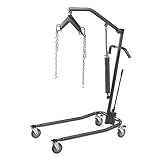 Drive Medical Hydraulic Patient Lift
A full lift is what makes one person able to manage a transfer alone. It is the single purchase that most often delays a move into residential care.
Check price on Amazon →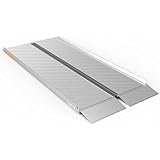 EZ-ACCESS Singlefold Wheelchair Ramp, 6 ft
Folds like a suitcase and carries in a car boot, so the same ramp handles the front step at home and the kerb at an appointment.
Check price on Amazon → Drive Medical Nitro Rollator with Seat
The seat matters more than the wheels. Being able to stop and rest is what decides whether someone still goes out at all.
Check price on Amazon → Vive Stand Assist Rail for Couch or Chair
Getting out of a low sofa is where most falls at home start. This is the cheapest thing on the list and often the first one needed.
Check price on Amazon →As an Amazon Associate we earn from qualifying purchases, at no extra cost to you. Researched guidance, not medical advice. Prices change, so check before buying.
The biggest difference: who answers the call
The most important distinction is what happens after the alert fires. With a medical alert system, the signal goes to a 24/7 professional monitoring center staffed by trained agents. They already have your parent's medical history, emergency contacts, and even a lockbox code, so they can speak to your parent, assess the situation, and dispatch the right help, or call you instead of 911 for a minor issue. A smartwatch like the Apple Watch generally connects the wearer directly to 911. There is no dedicated monitoring center, no stored medical profile, and no one to handle a non-emergency or a confused user. For a parent who lives alone or could be disoriented after a fall, that human monitoring layer is a meaningful safety advantage.
Charging, battery, and reliability
A safety device only protects your parent if it is on and worn. This is where smartwatches stumble for many older adults: an Apple Watch lasts only about one to three days per charge and must be taken off and recharged regularly. If your parent forgets, the device is dead exactly when it is needed. Many medical alert devices run for days or weeks between charges, and some in-home base systems essentially never need the wearer to manage charging at all. They also do not depend on your parent owning or carrying a smartphone. If charging discipline or tech reliability is even a slight worry, the medical alert is the safer bet.
Fall detection: not all equal
Automatic fall detection is a headline feature for both, but accuracy varies. In independent testing, the Apple Watch reliably detects only hard falls and misses many of the softer, slower falls common among older adults. Dedicated medical alert watches and devices have generally performed better at catching a wider range of falls, with some newer models using AI to cut down on false alarms. No fall detection is perfect on any device, so it should be treated as a backup to a manually pressed help button, not a guarantee. If fall detection is your main reason for buying, lean toward a system built specifically for it.
When a smartwatch is the right call
None of this means a smartwatch is a bad choice for everyone. For a parent who is genuinely tech-comfortable, already lives on their phone, and will keep a watch charged, an Apple Watch or similar device folds emergency SOS and fall detection into something they will actually wear all day, plus fitness tracking, messaging, and calls. The all-in-one appeal and the fact that it looks like a normal watch, not a medical pendant, can mean the difference between a device that gets worn and one that sits in a drawer. The honest tradeoff is versatility and acceptance versus the dedicated monitoring, simplicity, and battery life of a true medical alert.
Frequently Asked Questions
Not quite, for most older adults. An Apple Watch can detect hard falls and connect to emergency SOS, but it dials 911 directly with no 24/7 monitoring center and no stored medical history, and it needs daily charging. A medical alert system adds trained operators who know your parent and devices that run far longer between charges, which generally makes it the safer, more reliable choice.
Yes. Most medical alert systems work over a built-in cellular connection or a landline base unit and do not require your parent to own a smartphone or even have Wi-Fi. That independence is a key reason they suit seniors who are not tech-comfortable, unlike a smartwatch that often pairs with a phone.
Medical alert systems typically run about $20 to $45 per month, with fall detection often adding around $10 per month, and little to no upfront cost. A smartwatch has a higher upfront price (often $250 or more) plus an optional cellular plan, but no monitoring subscription, because it does not include professional monitoring.
A dead smartwatch cannot detect a fall or call for help, which is the main reliability concern. Apple Watches last only about one to three days per charge, so a parent who is forgetful may be left unprotected. Many medical alert devices last much longer or use a base station that avoids daily charging entirely.
Yes. Fall detection is available as a feature on most modern medical alert systems (often for a small monthly add-on) and is built into the Apple Watch and similar smartwatches. Testing suggests dedicated medical devices catch a wider range of falls, but on either device fall detection should be treated as a backup to a manual help button rather than a guarantee.